
Migrating a 500 GB Production MariaDB Database from Amazon RDS to EC2, With a Rollback Path
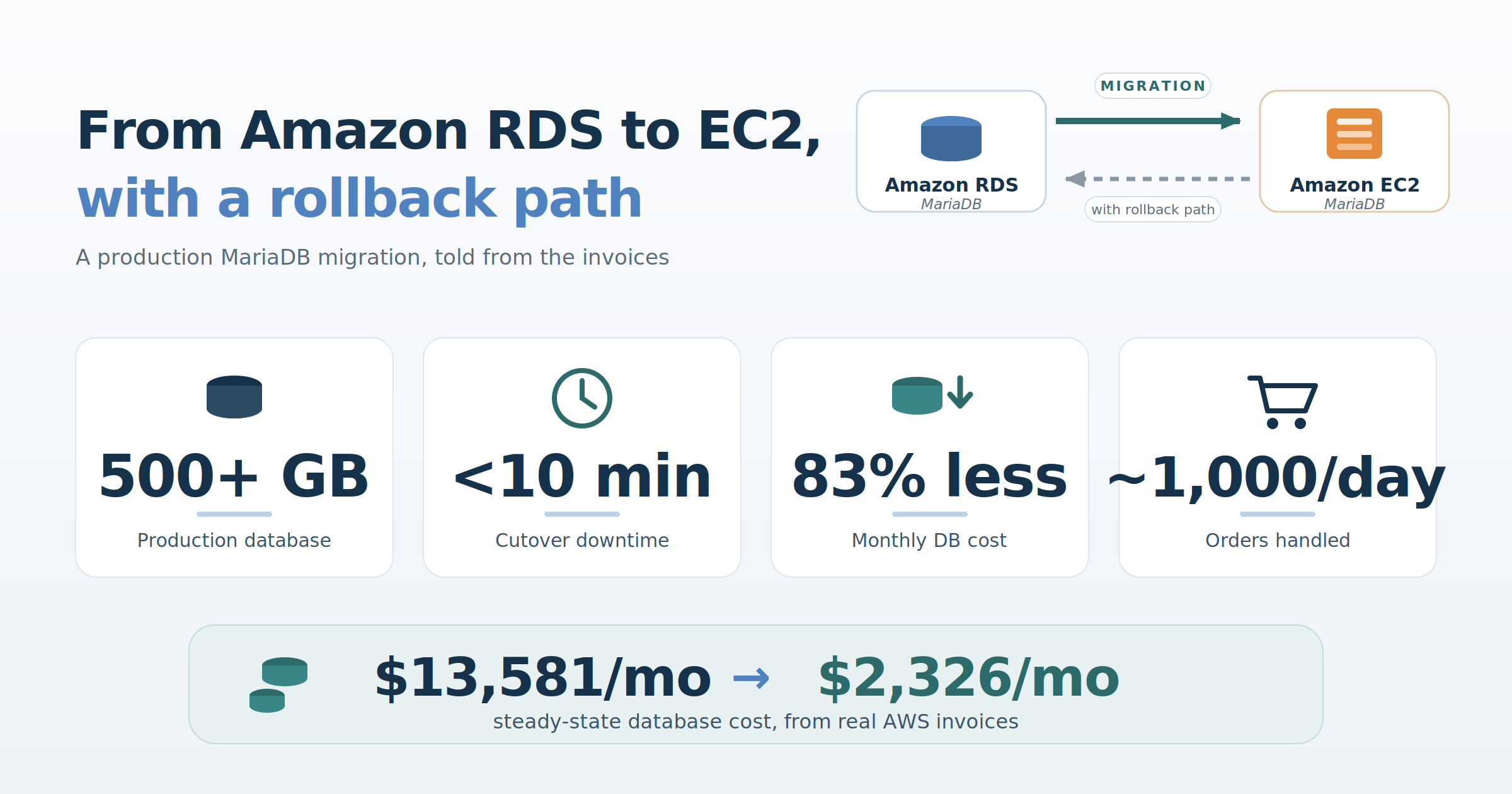
A field report: how we moved a busy Magento store’s MariaDB database off RDS with under 10 minutes of downtime, kept a live path back to RDS for weeks afterwards, and cut the monthly database bill by more than 80 percent. All cost figures in this article come from real AWS invoices.
Who we are, and what this article proposes
We are luroConnect, a managed hosting platform for Magento (Adobe Commerce) and other commerce stacks. We design and operate each store’s infrastructure inside the customer’s own AWS, GCP, or Azure account, which means database architecture decisions like the one in this article are ours to make and ours to live with.
The proposition this article defends is specific: for a large, busy production MariaDB database, self-managed MariaDB on EC2 can beat Amazon RDS on cost by a wide margin, without giving up performance. The cost claim is fully measured, with invoices included. The performance claim is qualitative and we present it as such: the customer and their agency report the store running faster after the move, not slower. Cost, to be clear, was the sole driver of this migration; faster pages were the outcome that answered a doubt, not the objective. The migration itself can be done with minutes of downtime while keeping a genuine, tested path back to RDS the whole way. We demonstrate all of it with one real customer engagement.
The setup, and the doubt
The database in question powers a Magento (Adobe Commerce) store doing roughly a thousand orders a day. At the time of the migration the MariaDB schema was over 500 GB of data and indexes; a later optimization effort by the customer’s agency has since brought it to about 390 GB, and where the distinction matters below, we say which figure applies. When the site was first onboarded to the luroConnect platform, the customer’s development agency insisted on Amazon RDS. Their reasoning was performance: they did not believe MariaDB on self-managed EC2 could serve a database of this size as fast as RDS. We disagreed, but RDS it was.
A year later the same customer asked us to reduce their AWS bill, and the database line stood out. In June 2025, a steady-state month, RDS for this one database cost $13,313: a db.r6i.12xlarge Multi-AZ master, a db.r6i.4xlarge read replica, and $3,515 of provisioned io2/gp3 storage. July was slightly higher at $13,581. That number is what finally put “move off RDS” on the table.
The agency agreed to try, on two conditions that shaped the entire project:
- A near-zero-downtime transition, and
- A near-zero-downtime way to roll back to RDS if anything, including performance, turned out worse.
We had already written up the general argument for EC2 over RDS for MariaDB, covering atomic writes and the double-write buffer, replica creation, and cost structure. This article is the follow-up we promised there: how the migration was actually done.
An incident from the RDS period, and what it changed in the design
Cost drove the decision. Before describing the migration, though, one production incident from our time on RDS is worth recounting, because it directly shaped how the EC2 servers were laid out, and because the failure mode is a subtle one that other RDS operators may recognize.
A read replica hit a replication error and its SQL thread stopped. On a self-managed server this is an annoyance: you diagnose, you fix or skip, replication resumes. On RDS you have no SUPER privilege, so recovery goes through stored procedures such as mysql.rds_skip_repl_error, and binlog retention is managed through CALL mysql.rds_set_configuration('binlog retention hours', ...) rather than directly.
While the replica sat broken, the master kept retaining binlogs the replica had not consumed. RDS gives you a single storage volume, so those binlogs accumulated on the same disk as the data directory. Storage autoscaling dutifully grew the volume toward its configured 4 TB ceiling, reached it, and with no room left to write, the master stopped. A silent failure on a read replica took down the primary, by way of binlog accumulation on a shared volume that we could neither partition nor directly inspect.
The lesson was not “RDS is bad”. It was narrower: when this class of problem occurs, the managed layer limits what you can see and do about it. Our EC2 design responds to it directly. The binlogs are written to a dedicated volume, separate from the data directory (log-bin = /backup/binlogs/mariadb-bin, on its own EBS volume alongside backups), each volume monitored independently. The RDS failure mode, binlogs silently consuming the data volume up to a hard storage ceiling, is structurally impossible in this layout: binlog growth can trip an alert on its own disk, but it can never eat the data directory’s space. And when a replica misbehaves, the full standard MariaDB replication toolkit is available, not a subset exposed through stored procedures.
Preparation is the migration; cutover is just a switch
The cutover took under ten minutes. The reason it could is that the preparation took weeks, and every step of it was reversible. The version question, incidentally, answered itself: Magento dictates the supported MariaDB series, so the EC2 build ran the same MariaDB version as RDS, a strict 1:1 mapping with no upgrade mixed into the migration.
The replication chain we built looked like this:
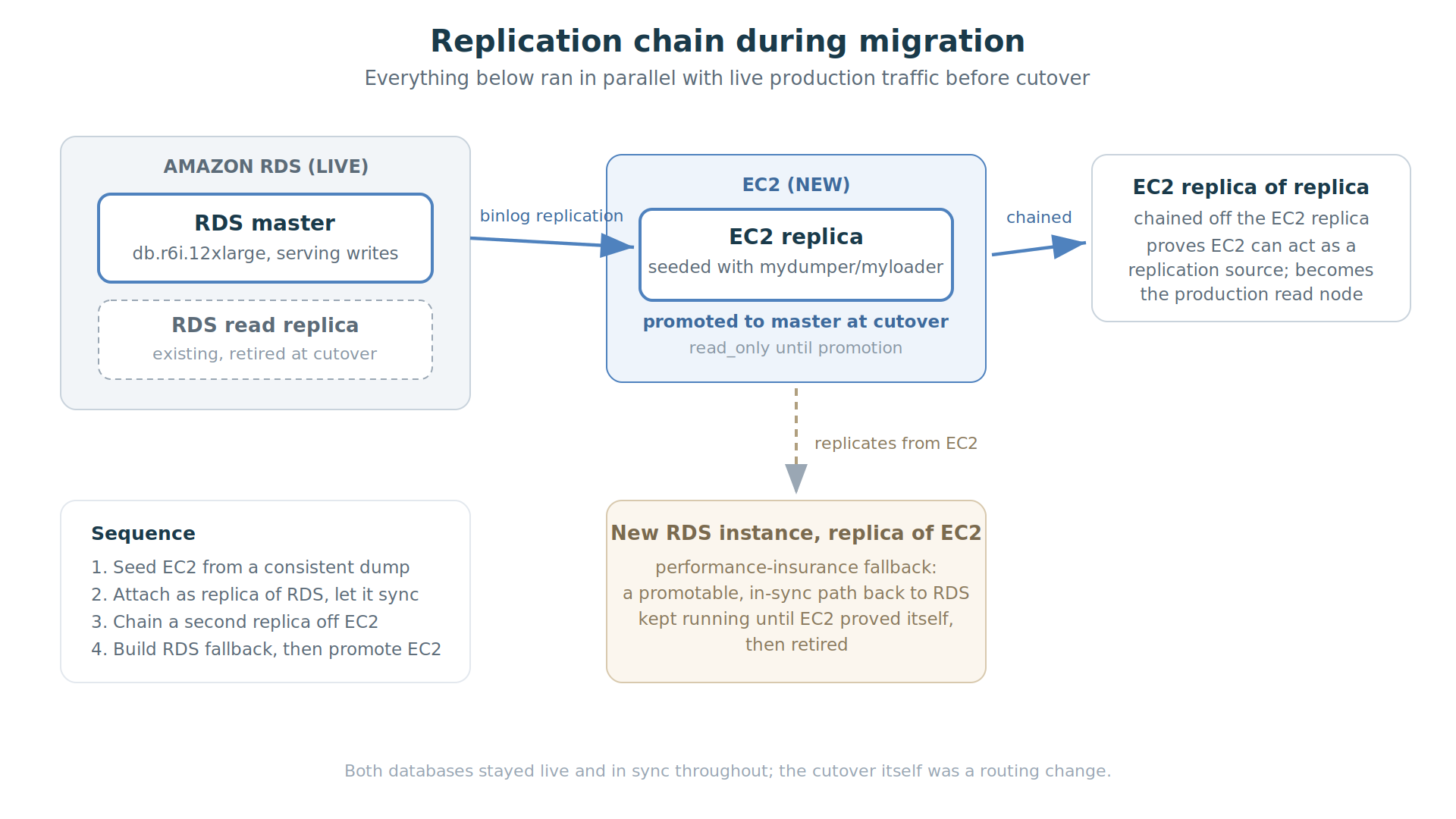
Step 1: seed the EC2 replica. We launched the EC2 instance, provisioned a data volume plus a separate volume for binlogs and backups, and took a full backup of the RDS master using mydumper, restoring with myloader. For a database of this size, mydumper’s parallelism is the difference between a restore measured in hours and one measured in days; its metadata also records the consistent GTID position of the snapshot, which is exactly what you need to attach the restored server as a replica afterwards. Replication throughout the chain was GTID-based (MariaDB GTIDs, MASTER_USE_GTID), which made the chained topology, and later the promotion, far less error-prone than juggling binlog file-and-position coordinates across three servers. Getting a consistent snapshot out of a live RDS master is one of the fiddlier parts of the whole exercise (this is an area where RDS’s own one-click replica creation genuinely shines), and we scheduled the dump away from Magento’s indexing and setup:upgrade windows.
Step 2: attach and let it sync. The EC2 server came up read_only, was attached to the RDS master using the GTID position from the dump’s metadata, and caught up. It then ran for days as a live replica of production, applying the real write load. This is the quiet, unglamorous phase that matters most: before anyone commits to anything, the new server has already demonstrated it can keep pace with production writes.
Step 3: chain a replica off the replica. We then built a second EC2 server as a replica of the EC2 replica. This proved two things at once: that the EC2 server could act as a replication source (binlogs flowing out of it, not just into it), and it pre-built the read node that would serve production traffic after cutover.
Step 4: build the way back. Finally we created a fresh RDS instance configured as a replica of the EC2 server. This was the agency’s rollback insurance, and it deserves its own section.
The rollback design: two distinct fallbacks
The rollback design had two mechanisms, for two different failure modes at two different times.
The fast revert (minutes after cutover). The application connects to the database through ProxySQL, not directly. At cutover, the old RDS master was still running and still consistent. If anything looked wrong in the first minutes, reverting meant swapping the ProxySQL backend configuration back to RDS. No restore, no data movement, near-zero downtime.
The performance fallback (days or weeks after cutover). The premise under debate was whether EC2 could match RDS under sustained production load. That question cannot be answered in a maintenance window; it takes real traffic over real days. So the RDS-replica-of-EC2 from step 4 stayed running after cutover, continuously in sync with the new EC2 master. If EC2 performance had disappointed, we could have promoted that RDS instance (stopping its replication via mysql.rds_stop_replication) and swapped ProxySQL back, again with minimal downtime and no data loss, even weeks after RDS had stopped being the source of truth.
Through August 2025 both stacks ran in parallel, and the invoices show it: RDS $9,269 plus the new EC2 database server $3,377 in the same month.
Cutover night
The actual switch, with the whole chain in sync:
- Put the site into maintenance mode and stop the Magento crons.
- Promote the EC2 replica: end its replication from RDS, clear
read_only. - Swap the ProxySQL backend configuration from RDS to the EC2 master.
- Test the full site from a whitelisted IP while still in maintenance mode.
- Lift maintenance mode.
Notice what is absent from that list: nothing on the application servers changed. Magento’s database connection settings in app/etc/env.php point at the ProxySQL endpoint, and that endpoint did not move, so there was no configuration to edit, no app:config:import to run, and no PHP-FPM reload to perform. The entire switch of a production database from one server to another happened one layer below the application, in a proxy backend definition. That is the practical payoff of putting the proxy in front of the database in the first place, and it is why the same operation, run in reverse, was the rollback plan.
The switch itself (steps 1 through 3) took under 10 minutes. We then spent the remainder of a 45-minute maintenance window running a complete round of testing behind the maintenance page before reopening the site. We would rather report the longer, tested number than the shorter one; the discipline of verifying before reopening is part of why the rollback paths were never needed.
The architecture on EC2
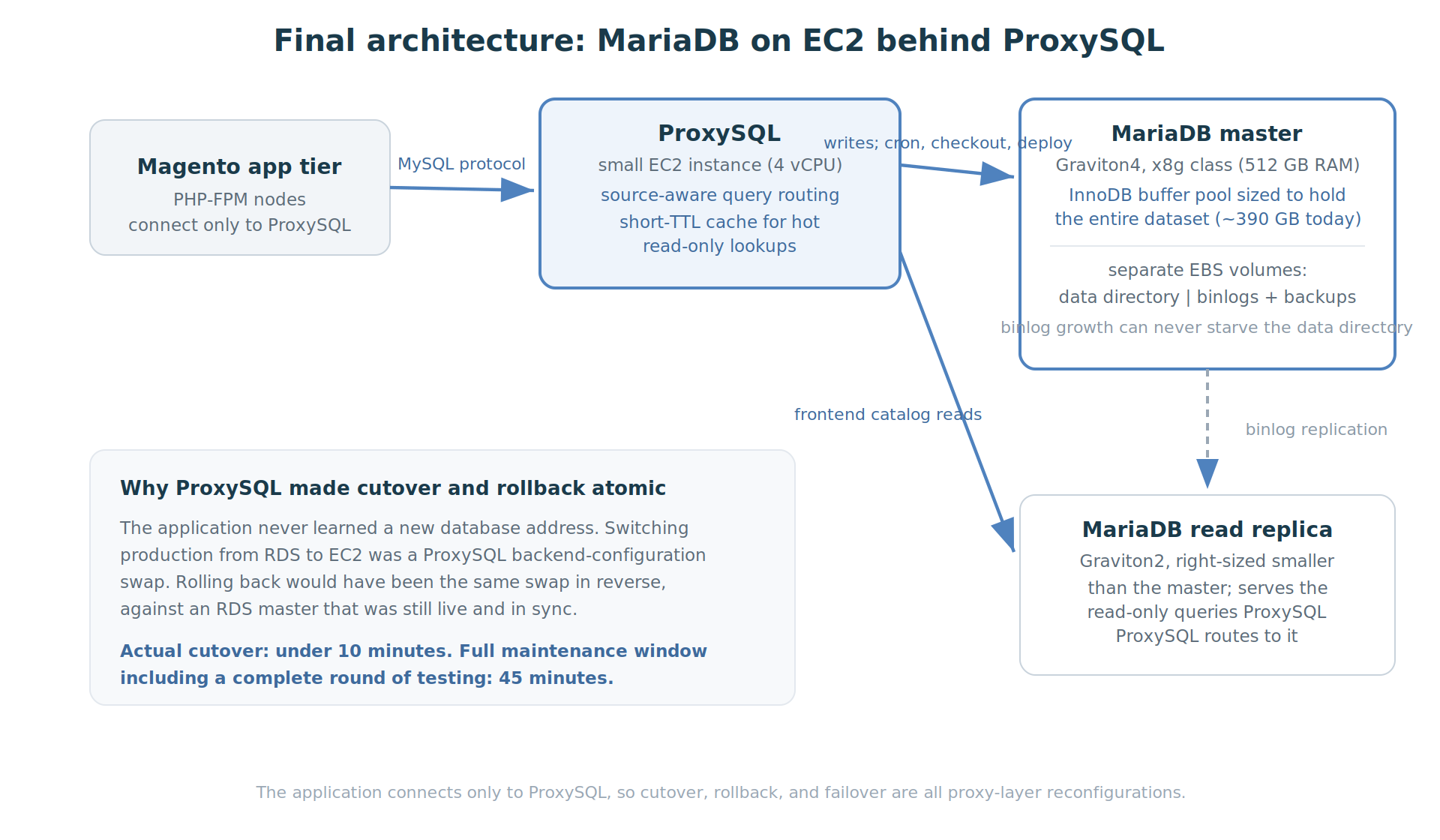
The agency’s original concern was speed. The answer was not “EC2 with the same settings”, and it is worth being precise about which parts of the design are specific to leaving RDS and which are not.
Size the buffer pool to the dataset. This is the part that is genuinely about EC2. On RDS, instance memory and storage are coupled to the instance class ladder, and the r6i.12xlarge master gave us 384 GB of RAM against a dataset that had grown past 500 GB. On EC2 we chose the instance to fit the data, not the other way around: a Graviton memory-optimized x8g.12xlarge with 768 GB of RAM, specifically so that innodb_buffer_pool_size could hold the entire 500 GB+ dataset with room to grow. A 512 GB instance would not have been enough at the time. Once most of the active working set can remain in the buffer pool, foreground reads are far less dependent on storage latency.
Route through ProxySQL. ProxySQL was introduced while the database was still on RDS, specifically in preparation for the cutover: putting the application behind a proxy first meant the eventual switch of database servers could be made in the proxy rather than in the application, and it was fronting the RDS master and replica for some time before EC2 entered the picture. It is not, then, an EC2 advantage; it is the layer that made the migration a routing change. A small ProxySQL instance (4 vCPUs) fronts the database and does two jobs: routing and caching. The routing is deliberately not a blind read/write split, because a blind split breaks Magento: checkout must read its own writes, crons and indexers write and immediately read back, and deployments run DDL. So the rules are source-aware first. Traffic from the cron servers, the checkout servers, and the server that runs deployment commands is pinned to the master unconditionally. Only frontend traffic is eligible for the replica, and within it, only queries matching regular expressions that identify reads against the catalog tables are routed there. Catalog reads are the ideal candidate: they dominate frontend query volume, and a category page tolerates a moment of replication lag where an order confirmation cannot. The second job is caching: hot, frequently repeated read-only lookups (Magento store configuration is the classic case) are held in ProxySQL’s query cache on a short TTL, so the busiest queries often never reach MariaDB at all.
Why the split lives in ProxySQL rather than in Magento: Magento Open Source has no native read/write split, and the routing described above, by source server and query pattern together, is only expressible in a proxy. The application keeps a single database endpoint and stays unaware of the topology behind it, which is precisely what made cutover and rollback a proxy-layer operation.
One detail worth noting for Magento operators: the two EC2 database servers are deliberately asymmetric. The master is a large Graviton4 memory machine; the replica is a much smaller Graviton2 instance, sized for the read traffic it actually serves.
High availability without Multi-AZ. The most legitimate question about leaving RDS is what replaces Multi-AZ failover, and it deserves a direct answer. Our answer is a master-to-replica failover procedure built around the same two components already described. On failure of the master, the replica is resized up to production class, promoted to master (replication stopped, read_only cleared), and ProxySQL is reconfigured to send writes to it; because the application only ever knew the ProxySQL endpoint, it needs no change at all. The procedure is wired to a CloudWatch alarm on the master instance so it can run automatically on a detected failure, and the same procedure is exposed as a button on the luroConnect dashboard for a manual, planned promotion, which is also how we handle maintenance on the master. This deliberately is not a live-live cluster, nor is it intended to reproduce RDS Multi-AZ semantics exactly. The HA model uses a MariaDB replica as a promotable standby, combined with ProxySQL for endpoint switching. In an unplanned failure, the achievable RPO depends on replication state at the time of failure, while RTO also includes promotion and, when necessary, resizing the standby. Accepting that difference is a conscious part of the trade, alongside the cost figures below.
The customer’s feedback after the move, unprompted: “We find uncached pages are served faster.” That sentence retired the performance fallback.
A note on evidence, since this article is otherwise built on invoices: we did not run formal before-and-after query benchmarks as part of this engagement. The performance claim is qualitative, resting on the customer’s and agency’s reports after weeks of production traffic, with the fallback to RDS available the entire time had their experience gone the other way. The cost claim, by contrast, is fully measured, and the invoices follow.
What it cost, month by month
So that the arithmetic can be checked, here is the database-attributable line from the invoices: RDS instance hours, RDS provisioned storage and backup storage, and after the move, the EC2 database instance (on-demand equivalent).
| Month | Database cost | What was running |
|---|---|---|
| Jun 2025 | $13,313 | RDS steady state (12xlarge Multi-AZ master + 4xlarge replica) |
| Jul 2025 | $13,581 | RDS peak; migration prep begins, Multi-AZ dropped late in the month |
| Aug 2025 | $12,646 | Parallel running: RDS $9,269 + EC2 master syncing $3,377 |
| Sep 2025 | $4,650 | Cutover ~Sep 1; RDS remnant is mostly retained snapshots |
| Oct 2025 | $4,553 | Snapshot storage tail on RDS + EC2 |
| Nov 2025 | $3,519 | Clean EC2 steady state (x8g.12xlarge) |
| Jun 2026 | $2,259 | Right-sized to x8g.8xlarge |
| Jul 2026 | $2,326 | x8g.8xlarge steady state |
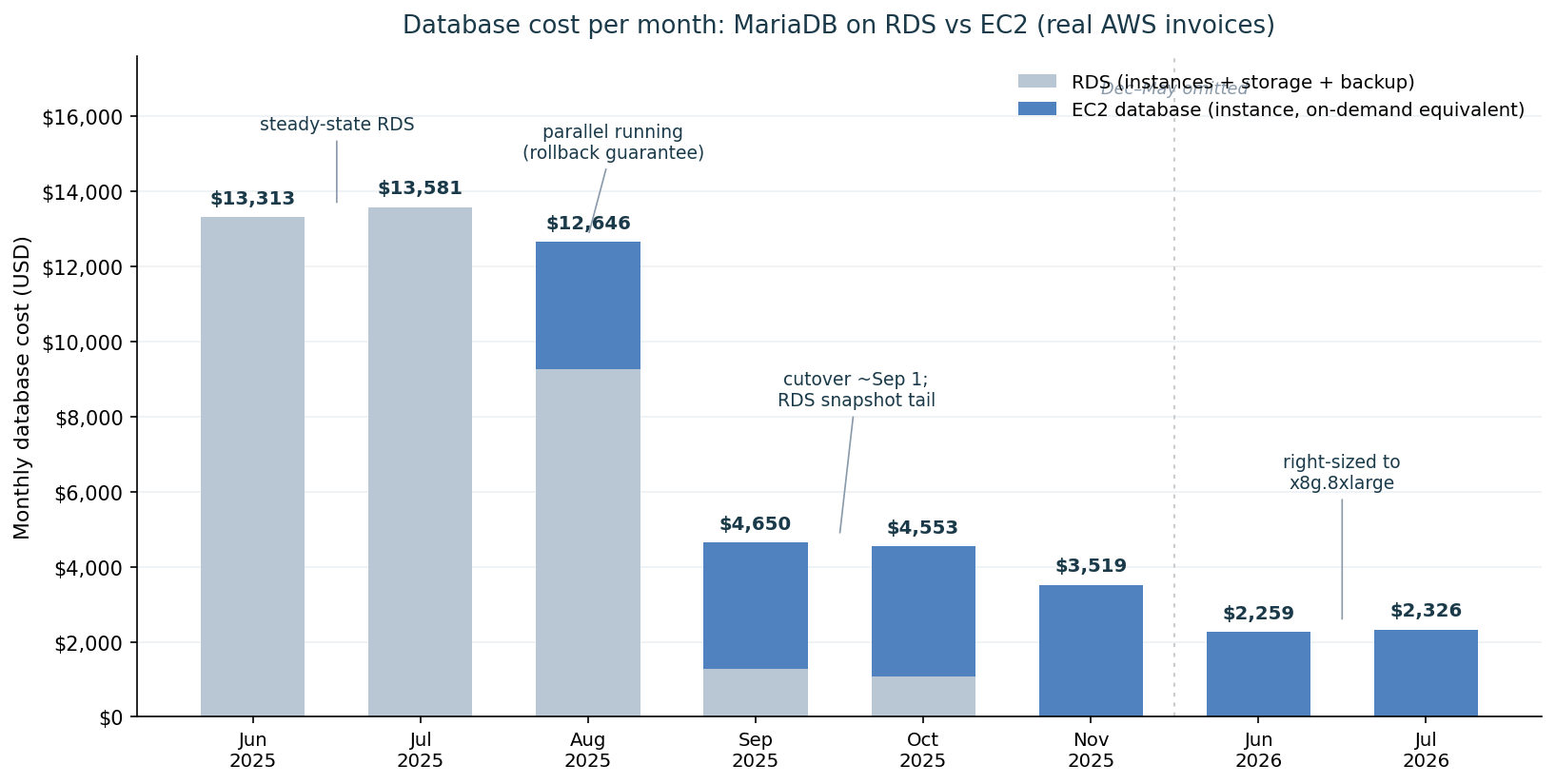
Three things in that curve deserve comment.
The parallel-running bump is deliberate. August’s total is barely below the RDS plateau because both stacks ran at once. That overlap was the migration method. A cheaper migration with no live source and no live fallback is a riskier one.
The snapshot tail is real money. Sep and Oct each carried around a thousand dollars of retained RDS snapshot storage. If you migrate off RDS, put “review and prune the snapshot retention” on the checklist, or the bill keeps a ghost of the old database for months.
The later step down is outside this migration’s scope, but the chart shows it, so briefly: the November master was an x8g.12xlarge (48 vCPU, 768 GB), sized so the buffer pool could hold the 500 GB+ dataset. CPU utilization on it was low, and once the agency’s optimization work brought the schema down to about 390 GB, a 512 GB instance could hold the whole dataset again, so the master was resized to an x8g.8xlarge at about $2,326 a month. End to end, July 2025 to July 2026, the database line fell from $13,581 to $2,326, an 83 percent reduction.
Three fairness notes on the numbers. First, the two columns do not buy the same high availability: the June baseline includes Multi-AZ instance hours and duplicated Multi-AZ storage, a synchronous standby the EC2 architecture does not reproduce (its HA model, and the RPO/RTO difference that comes with it, is described above). For what it is worth, the customer had already dropped Multi-AZ in late July while still on RDS, so the configuration actually replaced at cutover was Single-AZ; but the headline comparison uses the June figure, and readers should know what that figure contains. Second, all figures are stated at on-demand pricing so the two platforms are compared on the same pricing basis; in practice a compute savings plan covered most of the EC2 hours, so the cash cost is lower still, and the equivalent lever on RDS is a heavier reserved-instance commitment. Third, the comparison is instance-plus-storage for the database role on both sides; the ProxySQL instance is a 4 vCPU machine whose cost is a rounding error against either column.
RDS-specific gotchas, collected
For anyone attempting the same move, the friction points that cost us time:
- Binlog retention on RDS is set with
CALL mysql.rds_set_configuration('binlog retention hours', N). Set it long enough to cover your dump-and-restore window plus margin, or your new replica will ask for binlogs the master has purged. - No
SUPER: replication management on the RDS side goes through themysql.rds_*procedures (rds_set_external_master,rds_start_replication,rds_stop_replication,rds_skip_repl_error). Script against these, not the standard statements. - Consistent snapshots are the hard part. RDS’s own replica creation avoids the problem; doing it yourself means mydumper with care, scheduled away from indexers and deployments.
- Parameter groups do not map one-to-one onto my.cnf. Walk every non-default parameter and translate it deliberately. Our rule on EC2: every change is written to my.cnf even when applied dynamically, so a restart can never silently revert configuration. (The buffer pool, query cache, and
max_allowed_packetall changed intentionally in the move; do not assume the RDS values were right for the new hardware.) - Users and grants do not come along automatically with a data-only dump strategy; migrate them explicitly.
- Prune the snapshots after the goodbye, as the cost table above shows.
Closing
The doubt that started this story was reasonable. Managed databases exist because replication, backups, and failover are easy to get wrong. What this migration demonstrates: for a large, busy MariaDB database whose active working set fits in memory on modern instances, self-managed EC2 delivered production performance the customer describes as faster, at roughly one-sixth the steady-state cost, and the migration itself, done as a replication chain with a proxy-layer switch, needed less than ten minutes of downtime and carried a genuine, tested path back the whole way.
This is not an argument that every MariaDB workload should leave RDS. RDS trades cost and control for managed operations, and that trade-off is valuable to many users. This case shows what can be achieved when a team has the operational experience to manage MariaDB, replication, backups, monitoring and failover itself.
Pradip Shah is co-founder and Chief Architect at luroConnect. The migration described here was performed for a luroConnect customer; the customer is anonymized by agreement.