Built on logs, not tags
Every request your store serves is parsed by the platform, whether or not it ran a script. That is why we can see traffic your analytics cannot.

Assistants like ChatGPT, Claude and Perplexity read your store to answer questions about your products. They don’t run JavaScript, so your analytics never see them. Your server logs do — and luroConnect can send that record straight to your AI-visibility platform.
The blind spot
Buyers have started asking an assistant before they open a browser. The assistant reads the store, forms an answer, and sometimes sends a person along afterwards. The reading is invisible to the analytics every merchant already owns, because those tools work by running JavaScript in a browser — and an AI crawler does not run a browser.
The record of what actually happened does exist. It is in the web server logs, where every request lands whether or not it ran a script. Most hosts rotate those logs weekly and throw them away. luroConnect keeps them parsed and queryable — the dashboard is built on them.
| Browser analytics (JavaScript tag) | luroConnect server logs | |
|---|---|---|
| AI crawlers reading your pages | Not recorded — crawlers don’t run scripts | Recorded on every request |
| Assistants fetching a page for a user | Not recorded | Recorded, with the assistant named |
| Which AI system it was | — | More than 40 identified by name |
| Changes to your store | A tag on every page | None — it’s already in your server logs |
What Log Export does
Log Export puts that record into the AI-visibility platform you use — filtered the way you choose.
Every request your store serves is parsed by the platform, whether or not it ran a script. That is why we can see traffic your analytics cannot.
More than forty crawlers and assistant fetchers identified individually — not a single “bot” bucket. Know which AI is reading you, and how often.
The export runs on your own edge server and goes straight to your vendor. We build the configuration; the exported stream doesn’t pass through us.
Recognised today include
From OpenAI, Anthropic, Perplexity, Google, Apple, Amazon, Meta, ByteDance, Mistral, Cohere and others. New identifiers reach your server with its configuration — no software upgrade.
How it works
1 · In your dashboard
Pick the environment, the destination and the traffic. Preview the exact records against real recent traffic — nothing is sent until you enable it.
2 · On your server
The configuration is pushed to the log agent already running on your server. It filters, batches and sends over HTTPS — beside your log shipping, never in the request path.
3 · At your vendor
Profound Agent Analytics, or any HTTPS endpoint that accepts JSON, with optional signed payloads. The dashboard shows what was accepted and what was not.
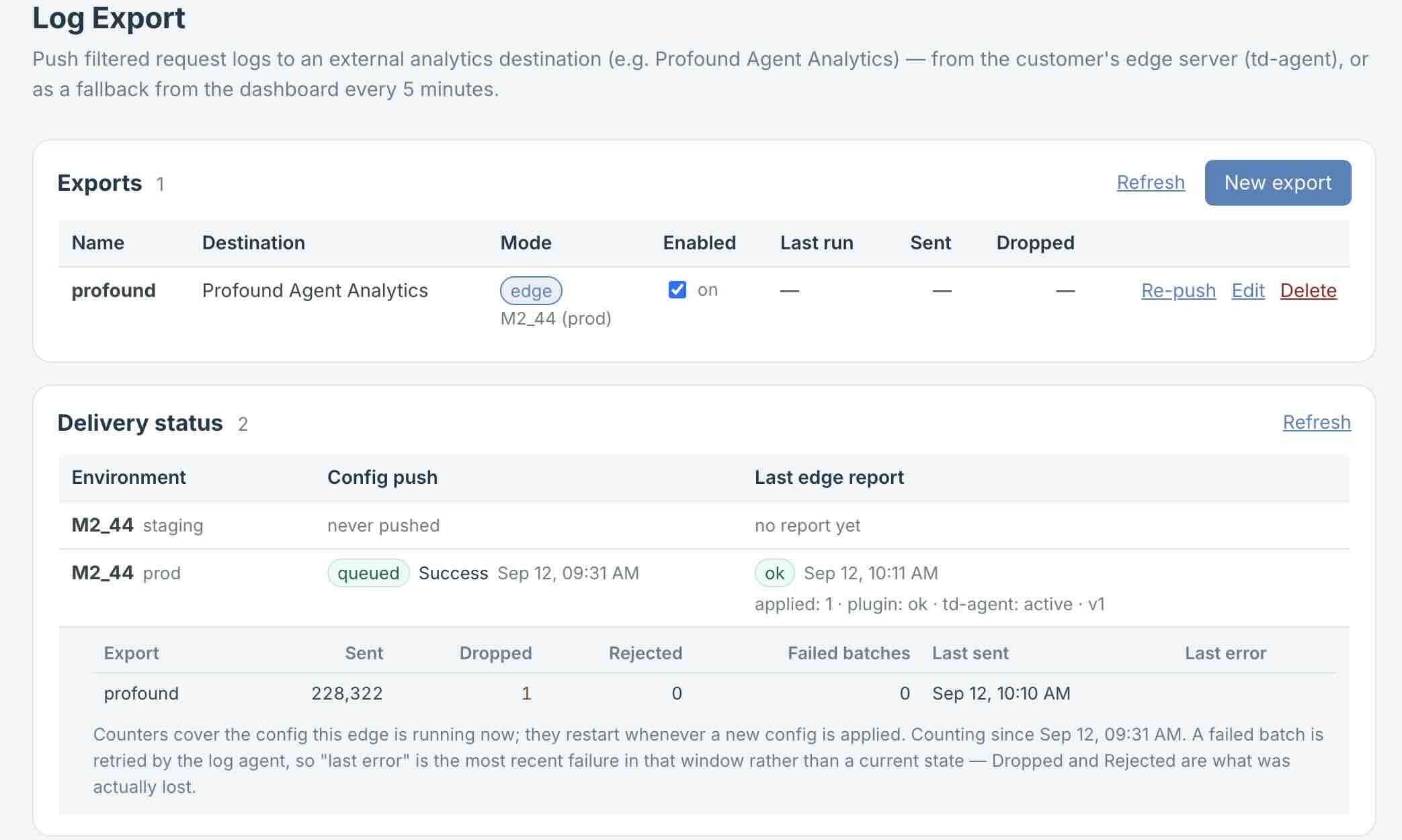
This is the shortest path from your store to your dashboard: pick the environment, paste your ingestion token, choose what to send. No tag, no extension in the store, no developer time.
Control
Filter on path, file extension, host, method, status, country, ASN, user-agent class, AI system or cache status.
Pick the columns. The Profound defaults are preset; remove anything your destination doesn’t use.
Exclude images and stylesheets. Drop cart, checkout and admin. AI crawlers only. Everything except our cache warmer. This environment only.
A dry run against real traffic from the last few minutes shows the exact records that would be sent. Nothing is sent.
Per environment: what was accepted, dropped or rejected, the last error, and the last successful send.
Batched, retried with backoff, and resumed without duplicates. A problem at the destination can’t reach your store.
Why it lives in the platform
Most hosting stacks discover AI crawlers the way they discover any bot: when something breaks. On luroConnect, bot traffic is already its own class — kept apart from shoppers in cache reporting and response-time charts, matched by user agent in DDoS rules — and Log Export names it, AI system by AI system.
Cache Insights
Bots and AI crawlers are counted separately from customers, so the number describes real shopping traffic.
DDoS Management
Rules can match a crawler’s user agent rather than an IP range.
Performance dashboard
Server response time is reported for human traffic on its own, so a crawl neither flatters nor ruins your numbers.
Log Export
Each AI system named, sent to the AI-visibility platform you already use.
No. No extension goes into your store and no tag goes on the page. The export runs in the log agent already on your luroConnect server.
No. The export is not in the request path. It reads the same log stream that already feeds your dashboard, and a problem at the destination cannot reach the store.
Your request logs already feed your luroConnect dashboard, within your plan’s log retention — that is what your analytics and cache reporting are built on. The export is separate: your own server sends it straight to your vendor, and the exported stream does not pass through our systems.
What you choose. The default for Profound is the request line, status, client address, user agent, referrer, byte count and timing, for traffic you have not filtered out. You can remove columns and add filters, and you can preview the exact records against real traffic before enabling it.
Client IP addresses and user agents can be personal data. You decide which columns leave and which traffic is included, and the send goes from your infrastructure to your vendor under your own agreement with them. Your data protection team should review the destination as they would any other processor.
Yes. Any HTTPS endpoint that accepts JSON, with an optional shared secret and signature so the receiver can verify the payload. More named destinations can be added.
Each AI vendor publishes a user-agent token for its crawler. We maintain the table and push it to your server with the configuration, so a newly announced crawler is recognised without a software update on your side.
Only when they identify themselves. An agent driving a normal browser with a stock user agent looks like a person in any log-based system, ours included. The named crawlers and fetchers, which are the bulk of AI reading today, are identified precisely.
It is configured per environment. Production is the normal case; staging is available where that environment runs the log agent.
Stores hosted on luroConnect managed hosting, enabled per project. Log Export is an add-on in any pricing band and included in High Traffic.
Log Export is an add-on for luroConnect managed hosting in any band, and included in High Traffic. Your store runs in your own AWS or GCP account. Talk to us about adding it.
Profound is a product of its respective owner. luroConnect supports Profound’s documented ingestion endpoint and is not affiliated with or endorsed by Profound.